Testimonials
Overview:
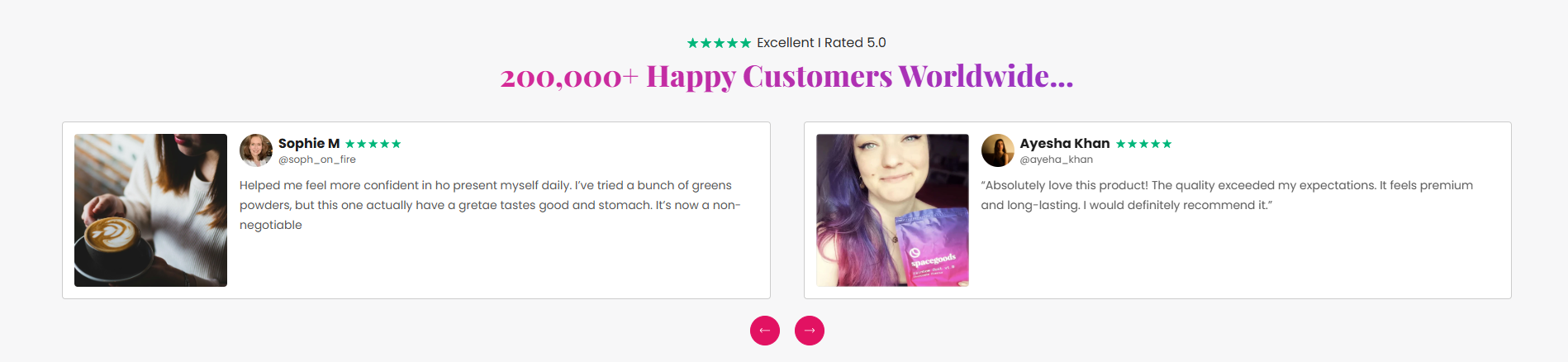
The Testimonials section is used to showcase customer reviews, user feedback, ratings, and social proof in multiple layouts such as grid, slideshow, and marquee styles. It supports author images, review headings, ratings, product references, review bars, typography customization, card layouts, slideshow controls, and responsive spacing settings. This section helps merchants build trust, increase credibility, and improve conversion rates through authentic customer experiences.
Blocks Configuration
Testimonial Block:
The Testimonial block displays individual customer reviews, author details, ratings, and optional product references.
Product Settings:
| Setting |
Description |
| Related Product |
Selects a product associated with the testimonial review. |
| Setting |
Description |
| Thumbnail Image |
Uploads a thumbnail image displayed inside the testimonial card. |
| Author Image |
Uploads the reviewer or customer profile image. |
Review Content:
| Setting |
Description |
| Review Heading |
Defines the main testimonial heading displayed inside the card. |
| Enable Stencil Heading |
Displays the review heading using stencil text styling when enabled. |
| Author Name |
Defines the customer or reviewer name. |
| Author Label |
Displays supporting author information such as username or handle. |
| Author Link |
Adds a URL link to the author label or profile. |
| Review Description |
Displays the main testimonial or customer feedback content. |
Rating Settings:
| Setting |
Description |
| Rating Value |
Defines the testimonial rating score. |
| Rating Text |
Displays supporting rating-related text content. |
| Rating Text Size |
Controls the size of rating text. |
| Rating Text Weight |
Adjusts the font thickness of rating text. |
| Rating Text Case |
Changes the text transformation style for rating text. |
Card Styling:
| Setting |
Description |
| Author Background Color |
Controls the background color behind the author content. |
| Author Text Color |
Controls the text color of author information. |
| Review Heading Color |
Controls the color of testimonial headings. |
| Review Heading Size |
Controls the size of testimonial headings. |
Card Alignment:
| Setting |
Description |
| Card Text Alignment (Desktop) |
Sets the horizontal alignment of testimonial content on desktop devices. |
| Card Text Alignment (Mobile) |
Sets the horizontal alignment of testimonial content on mobile devices. |
Section Configuration
Heading:
| Setting |
Description |
| Section Heading |
Defines the main heading displayed above the testimonials section. |
| Heading Size |
Controls the size of the heading text. |
| Heading Weight |
Adjusts the font thickness of the heading text. |
| Heading Case |
Changes the text transformation style such as uppercase, lowercase, capitalize, or default. |
| Heading Tag |
Sets the HTML heading tag level from H1 to H6 for SEO and accessibility purposes. |
| Heading Font Family |
Allows switching between default and body font family styles. |
| Heading Color Style |
Applies predefined color styling to the heading text. |
| Heading Link Style |
Controls the styling behavior of links used inside the heading content. |
| Enable Heading Gradient |
Enables gradient styling for the heading text. |
Description:
| Setting |
Description |
| Description Text |
Displays supporting content or introductory text below the section heading. |
| Description Size |
Controls the size of the description text. |
| Description Weight |
Adjusts the font thickness of the description text. |
| Description Case |
Changes the text transformation style for the description text. |
| Description Font Family |
Allows switching between default and heading font family styles. |
| Description Color Style |
Applies predefined color styling to the description text. |
Review Bar Settings:
| Setting |
Description |
| Profile Icon |
Uploads a profile icon displayed inside the review bar. |
| Trust Icon |
Uploads a trust badge or trust-related icon. |
| Rating Value |
Defines the overall testimonial rating score. |
| Rating Color |
Controls the color of the rating stars or icons. |
| Review Text |
Displays review-related content with dynamic rating elements. |
| Review Text Size |
Controls the size of review bar text. |
| Review Text Weight |
Adjusts the font thickness of review text. |
| Review Text Case |
Changes the text transformation style for review text. |
| Review Text Font Family |
Allows switching between default and heading font family styles. |
| Review Text Color Style |
Applies predefined color styling to review text. |
Card Settings
| Setting |
Description |
| Verified Icon |
Uploads an icon used for verified reviews. |
| Verified Icon Size |
Controls the size of the verified icon. |
| Thumbnail Image Size |
Controls the size of testimonial thumbnail images. |
| Rounded Thumbnail Image |
Displays thumbnail images with rounded corners when enabled. |
| Author Image Size |
Controls the size of reviewer profile images. |
| Show Author Image |
Displays author profile images inside testimonial cards. |
Review Card Heading:
| Setting |
Description |
| Review Card Heading Size |
Controls the size of testimonial card headings. |
| Review Card Heading Weight |
Adjusts the font thickness of testimonial headings. |
| Review Card Heading Case |
Changes the text transformation style for testimonial headings. |
| Review Card Heading Tag |
Sets the HTML heading tag level for testimonial headings. |
| Review Card Heading Font Family |
Allows switching between heading and body font family styles. |
| Review Card Heading Color Style |
Applies predefined color styling to testimonial headings. |
| Review Card Heading Link Style |
Controls the styling behavior of links used inside headings. |
Card Appearance:
| Setting |
Description |
| Show Card Border |
Displays borders around testimonial cards. |
| Transparent Background |
Makes testimonial card backgrounds transparent when enabled. |
Author Typography:
| Setting |
Description |
| Author Text Size |
Controls the size of author names. |
| Author Text Weight |
Adjusts the font thickness of author names. |
| Author Text Case |
Changes the text transformation style for author names. |
| Author Text Tag |
Sets the HTML heading tag level for author names. |
| Author Text Font Family |
Allows switching between heading and body font family styles. |
| Author Text Color Style |
Applies predefined color styling to author names. |
| Enable Author Gradient |
Enables gradient styling for author names. |
Description Typography:
| Setting |
Description |
| Description Size |
Controls the size of testimonial descriptions. |
| Description Weight |
Adjusts the font thickness of testimonial descriptions. |
| Description Case |
Changes the text transformation style for testimonial descriptions. |
| Description Font Family |
Allows switching between heading and body font family styles. |
| Description Color Style |
Applies predefined color styling to testimonial descriptions. |
Heading Layout Style:
| Setting |
Description |
| Heading Layout Style |
Controls whether headings appear as plain text or tag-style labels. |
| Heading Background Color |
Controls the background styling for tag-style headings. |
| Heading Text Color |
Controls the text color for tag-style headings. |
| Rating Star Color |
Controls the color of testimonial rating stars. |
Grid Settings:
| Setting |
Description |
| Desktop Columns |
Controls the number of testimonial columns displayed on desktop devices. |
| Mobile Columns |
Controls the number of testimonial columns displayed on mobile devices. |
| Desktop Grid Spacing |
Adds spacing between testimonial cards on desktop devices. |
| Mobile Grid Spacing |
Adds spacing between testimonial cards on mobile devices. |
Marquee Settings:
These settings are available when the layout style is set to Marquee.
| Setting |
Description |
| Marquee Direction |
Controls the scrolling direction of testimonial cards. |
| Marquee Speed |
Controls the scrolling animation speed of testimonial cards. |
| Pause on Hover |
Pauses the marquee animation when users hover over testimonial cards. |
Slideshow Settings
These settings are available when the layout style is set to Slideshow.
| Setting |
Description |
| Show Slideshow Arrows |
Displays navigation arrows for the testimonial slideshow. |
| Show Progress Bar |
Displays a slideshow progress indicator. |
| Enable Auto Play |
Automatically rotates testimonial slides. |
| Slideshow Interval |
Controls the autoplay delay timing between testimonial slides. |
Layout:
| Setting |
Description |
| Layout Style |
Controls whether testimonials display in grid, slideshow, or marquee layout styles. |
| Card Layout Style |
Controls the visual style variation of testimonial cards. |
| Container Layout |
Determines whether the section uses a contained, contained content, or full-width layout. |
| Container Width |
Controls the maximum width of the testimonial section container on desktop devices. |
| Text Alignment (Desktop) |
Sets the horizontal alignment of section content on desktop devices. |
| Text Alignment (Mobile) |
Sets the horizontal alignment of section content on mobile devices. |
Color Scheme:
| Setting |
Description |
| Section Color Scheme |
Applies a predefined color palette to the testimonial section background and content. |
| Inverse Color Scheme |
Inverts the selected color scheme styling for contrast variations. |
| Gradient Mode |
Enables gradient styling for the section background. |
