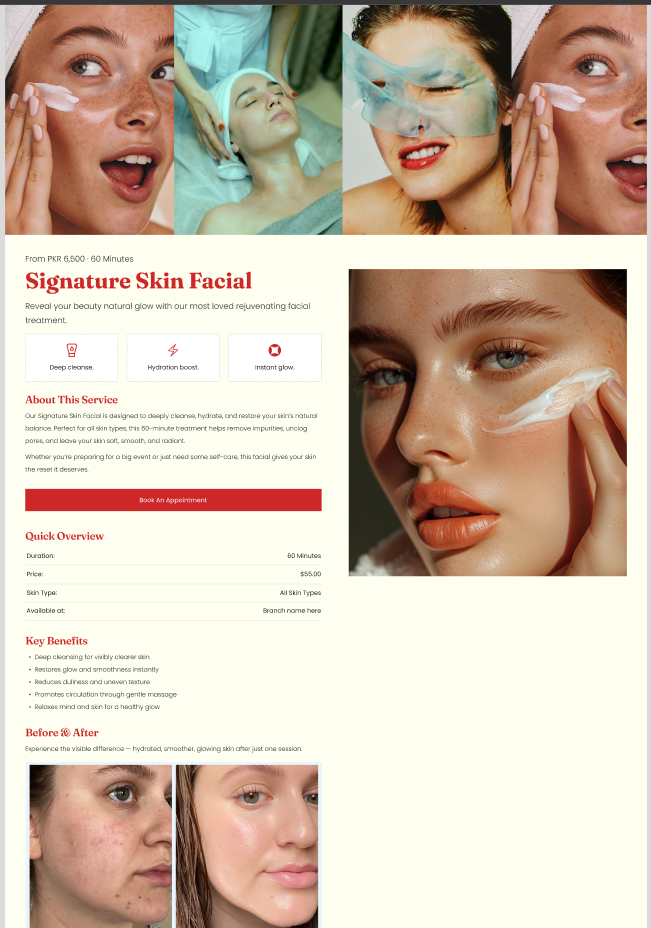
Product services template
Overview
In this template, both “Service Detail” and “Service Scroll” are used as separate sections in the product/services JSON.
- When a product is selected, its media is displayed in the marquee within the Service Scroll section.
- Meanwhile, the Service Detail section displays all relevant data associated with the selected product.
Service Detail Marquee:
| Setting |
Description |
| Card media ratio |
Aspect ratio for each marquee card: Adapt / Square / Portrait / Landscape |
Grid settings
| Setting |
Description |
| Desktop columns |
Number of visible items on desktop (2–4) |
| Mobile columns |
Number of visible items on mobile (1–2) |
| Setting |
Description |
| Direction |
Scroll direction: forward (right→left) or reverse (left→right) |
| Speed |
Scroll speed (10–50) |
| Desktop marquee gap |
Gap between items on desktop (0–50) |
| Mobile marquee gap |
Gap between items on mobile (0–50) |
| Pause on hover |
Stops scroll while hovered (true/false) |
Layout
| Setting |
Description |
| Container layout |
Page sizing style: page-width, contained-content, or container-fluid |
| Container size (Desktop) |
Max section width on desktop (50%–100%) |
| Text alignment (Desktop) |
Desktop text alignment (left / center / right) |
| Text alignment (Mobile) |
Mobile text alignment (left / center / right) |
| Color scheme |
Applies a theme color scheme to the section |
Inner padding
| Setting |
Description |
| Top (Desktop) |
Adds space above the section inner content on desktop |
| Bottom (Desktop) |
Adds space below the section inner content on desktop |
| Left (Desktop) |
Adds space to the left of inner content on desktop |
| Right (Desktop) |
Adds space to the right of inner content on desktop |
| Top (Mobile) |
Adds space above the section inner content on mobile |
| Bottom (Mobile) |
Adds space below the section inner content on mobile |
| Left (Mobile) |
Adds space to the left of inner content on mobile |
| Right (Mobile) |
Adds space to the right of inner content on mobile |
Outer padding
| Setting |
Description |
| Top (Desktop) |
Adds space above the section (outside) on desktop |
| Bottom (Desktop) |
Adds space below the section (outside) on desktop |
| Left (Desktop) |
Adds space left of the section (outside) on desktop |
| Right (Desktop) |
Adds space right of the section (outside) on desktop |
| Top (Mobile) |
Adds space above the section (outside) on mobile |
| Bottom (Mobile) |
Adds space below the section (outside) on mobile |
| Left (Mobile) |
Adds space left of the section (outside) on mobile |
| Right (Mobile) |
Adds space right of the section (outside) on mobile |
Service Detail:
Section Configuration:
| Setting |
Description |
| Media position |
Controls where media appears: media-first or media-second |
Layout
| Setting |
Description |
| Container layout |
Page sizing style: page-width, contained-content, or container-fluid |
| Container size (Desktop) |
Max section width on desktop (50%–100%) |
| Text alignment (Desktop) |
Desktop text alignment (left / center / right) |
| Text alignment (Mobile) |
Mobile text alignment (left / center / right) |
| Color scheme |
Applies a theme color scheme to the section |
Inner padding
| Setting |
Description |
| Top (Desktop) |
Adds space above the section inner content on desktop |
| Bottom (Desktop) |
Adds space below the section inner content on desktop |
| Left (Desktop) |
Adds space to the left of inner content on desktop |
| Right (Desktop) |
Adds space to the right of inner content on desktop |
| Top (Mobile) |
Adds space above the section inner content on mobile |
| Bottom (Mobile) |
Adds space below the section inner content on mobile |
| Left (Mobile) |
Adds space to the left of inner content on mobile |
| Right (Mobile) |
Adds space to the right of inner content on mobile |
Outer padding
| Setting |
Description |
| Top (Desktop) |
Adds space above the section (outside) on desktop |
| Bottom (Desktop) |
Adds space below the section (outside) on desktop |
| Left (Desktop) |
Adds space left of the section (outside) on desktop |
| Right (Desktop) |
Adds space right of the section (outside) on desktop |
| Top (Mobile) |
Adds space above the section (outside) on mobile |
| Bottom (Mobile) |
Adds space below the section (outside) on mobile |
| Left (Mobile) |
Adds space left of the section (outside) on mobile |
| Right (Mobile) |
Adds space right of the section (outside) on mobile |