Promotion banner
Overview
The Promotion Banner section is designed to highlight a promotional message alongside supporting imagery. It uses a two-part layout (content + images) and includes controls for desktop media position, media ratio, container width, text alignment, color scheme, and responsive spacing. The preset includes a content group (tagline, headings, button) and an image group with two promotional images.
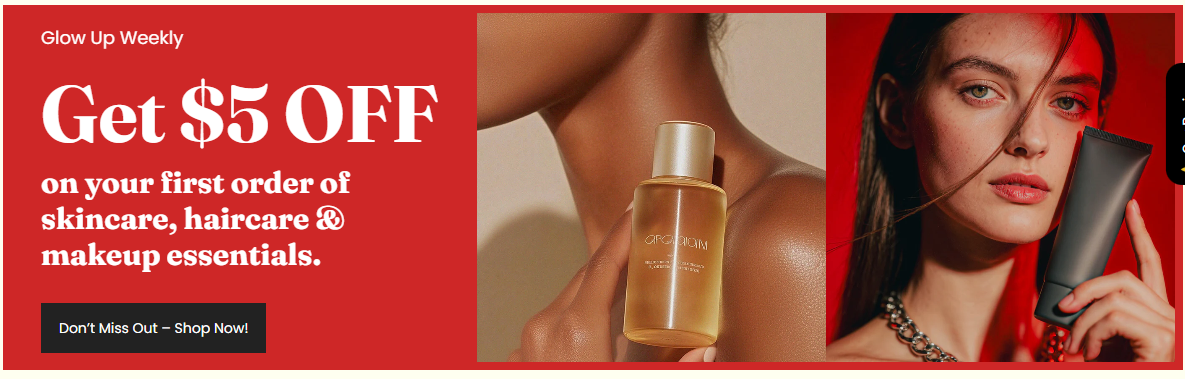
Section Configuration:
Layout
| Setting |
Description |
| Desktop media position |
Controls whether the media (image group) appears before or after the content on desktop. |
| Media ratio |
Sets the aspect ratio used for the promotional images (Adapt, Square, Portrait, Landscape). |
| Container layout |
Controls how the section is sized on the page: page-width (boxed), contained-content, or container-fluid (full width). |
| Container size (Desktop) |
Sets the maximum section width on desktop as a percentage (50%–100%). |
| Text alignment (Desktop) |
Controls text alignment on desktop (left, center, right). |
| Text alignment (Mobile) |
Controls text alignment on mobile (left, center, right). |
| Color scheme |
Applies a theme color scheme to the section styling. |
Inner padding
| Setting |
Description |
| Top (Desktop) |
Adds space above the section’s inner content on desktop. |
| Bottom (Desktop) |
Adds space below the section’s inner content on desktop. |
| Left (Desktop) |
Adds space to the left of the section’s inner content on desktop. |
| Right (Desktop) |
Adds space to the right of the section’s inner content on desktop. |
| Top (Mobile) |
Adds space above the section’s inner content on mobile. |
| Bottom (Mobile) |
Adds space below the section’s inner content on mobile. |
| Left (Mobile) |
Adds space to the left of the section’s inner content on mobile. |
| Right (Mobile) |
Adds space to the right of the section’s inner content on mobile. |
Outer padding
| Setting |
Description |
| Top (Desktop) |
Adds space above the section (outside the section content) on desktop. |
| Bottom (Desktop) |
Adds space below the section (outside the section content) on desktop. |
| Left (Desktop) |
Adds space on the left side of the section (outside) on desktop. |
| Right (Desktop) |
Adds space on the right side of the section (outside) on desktop. |
| Top (Mobile) |
Adds space above the section (outside) on mobile. |
| Bottom (Mobile) |
Adds space below the section (outside) on mobile. |
| Left (Mobile) |
Adds space on the left side of the section (outside) on mobile. |
| Right (Mobile) |
Adds space on the right side of the section (outside) on mobile. |
Blocks Configuration:
Promotion Banner Content
A content group used to display the promotion message and a call to action.
| Block |
Description |
| Tagline |
Displays a short introductory line above the main promotion heading. |
| Heading |
Displays the main promotion headline. |
| Subheading |
Displays supporting text beneath the main heading (often used for offer details). |
| Button |
Adds a call-to-action button beneath the text content. |
| Setting |
Description |
| Label |
Sets the text shown on the button. |
| Button style |
Selects the button style (Primary in the preset). |
| Text case |
Controls capitalization styling for the button label. |
| Margin (Desktop) |
Adds space above/below the button on desktop. |
| Margin (Mobile) |
Adds space above/below the button on mobile. |
A image group used to display one or more promotional images.
| Block |
Description |
| Image |
Displays the image area of the promotion banner and contains the promotional image blocks. |
| Block |
Description |
| Promotional image |
Adds a single image inside the promotion banner’s image group. Multiple images can be used to build the layout. |
