Contact form
Overview:
The Contact form is a useful section that enable customers to input their details and send a message directly to the merchant. Your contact form sends all submissions to your store’s Sender email address. You can change the sender email address in the store details settings page of your Shopify admin.
The form has the following fields:
- Name
- Email(Required)
- Message
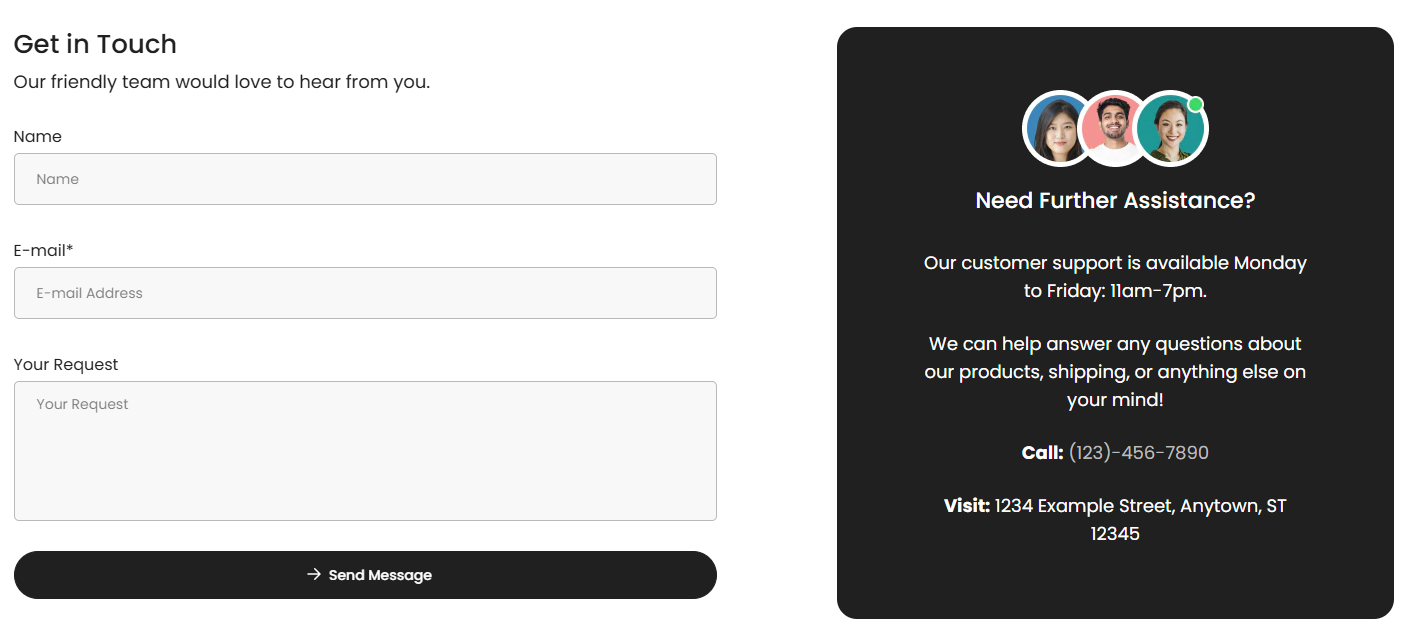
Section Configuration:
Content Customization
| Setting |
Description |
| Heading |
An inline rich text field for the main heading with a default value of "Get in Touch". |
| Heading Size |
A select field to choose the heading size with options ranging from extra large to extra small, defaulting to medium. |
| Description |
An inline rich text field for a section description with a default value of "Our friendly team would love to hear from you." |
| Text Size |
A select field for text size with options for small, medium, and large, defaulting to large. |
Color Scheme Settings
| Setting |
Description |
| Color Scheme |
Choose a predefined color scheme to ensure consistency with the store’s branding. |
Spacing Settings
| Setting |
Description |
| Top Padding |
Adjust the space above the section content. |
| Bottom Padding |
Adjust the space below the section content. |
Blocks Configuration:
| Setting |
Description |
| Image |
An image picker for adding an image. |
| Heading |
An inline rich text field for the block heading with a default value of "Need Further Assistance?". |
| Heading Size |
A select field to choose the block heading size with options ranging from extra large to extra small, defaulting to small. |
| Description |
A rich text field for the block description with a default value providing contact information. |
| Text Size |
A select field for text size with options for small, medium, and large, defaulting to large. |
| Color Scheme |
Choose a predefined color scheme to ensure consistency with the store’s branding. |
Social Box
| Setting |
Description |
| Background Image |
An image picker for adding a background image. |
| Logo Image |
An image picker for adding an logo image. |
| Heading |
A text field for the social box heading with a default value of "@Urbandén". |
| Heading Size |
A select field to choose the block heading size with options ranging from extra large to extra small, defaulting to small. |
| Subheading |
A text field for the subheading with a default value of "1.3k followers". |
| Description |
A rich text field for the block description with a default value providing contact information. |
| Link URL |
A URL field for adding a link. |
| Open in New Window |
A checkbox to determine if the link should open in a new window, defaulting to false. |
| Text Size |
A select field for text size with options for small, medium, and large, defaulting to large. |
| Color Scheme |
Choose a predefined color scheme to ensure consistency with the store’s branding. |
