Collection list with image
Overview
The "Collection List with Image" section is designed for showcasing product collections alongside their respective images on your Shopify store. This section provides a dynamic way to highlight specific collections, making it perfect for seasonal promotions, new arrivals, or featured categories.
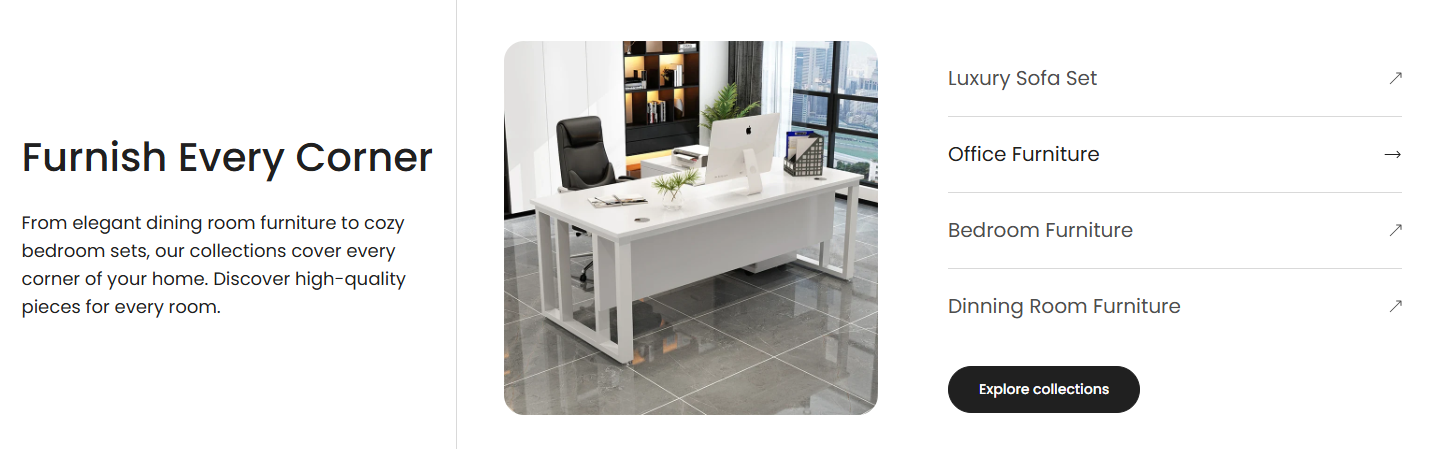
Section Configuration:
Heading Settings
| Setting |
Description |
| Heading |
Set the section's main title. Configurable to align with the content's focus. |
| Section Heading Size |
Choose the size of the heading to establish visual hierarchy |
Description Settings
| Setting |
Description |
| Section Description |
Provide a description for the section, giving context or additional information about the collections displayed. |
| Text Size |
Set the size of the text used in the description for better readability and design alignment. |
| Setting |
Description |
| View More Label |
Text for the button that leads to more details about the collections. |
| View More Type |
Style the button as primary (more prominent) or secondary. |
| View More Link |
URL for the button, directing users to a detailed page. |
| Open in New Window |
Option to open the link in a new browser tab. |
Layout and Order Settings
| Setting |
Description |
| Section Text Order |
Decide the arrangement of text relative to images, either in a row or a reverse row. |
| Desktop image order |
Decide the arrangement of image relative to text. |
| Setting |
Description |
| Section Media Size |
Select the size and aspect ratio for images to ensure they fit well within the design (e.g., adapt, square, portrait, landscape). |
Text Alignment Settings
| Setting |
Description |
| Section Text Alignment |
Control the alignment of text on desktop views. |
| Section Mobile Text Alignment |
Control the alignment of text on mobile devices. |
Color Scheme Settings
| Setting |
Description |
| Color Scheme |
Choose a predefined color scheme to ensure consistency with the store’s branding. |
Spacing Settings
| Setting |
Description |
| Top Padding |
Adjust the space above the section content. |
| Bottom Padding |
Adjust the space below the section content. |
Blocks Configuration
Collection Block
| Setting |
Description |
| Collection |
Link the block to a specific product collection. |
| Image |
Choose an image that represents the linked collection. |
